Is Your Shopify Store Ready to Go Headless in 2026? A Decision Guide
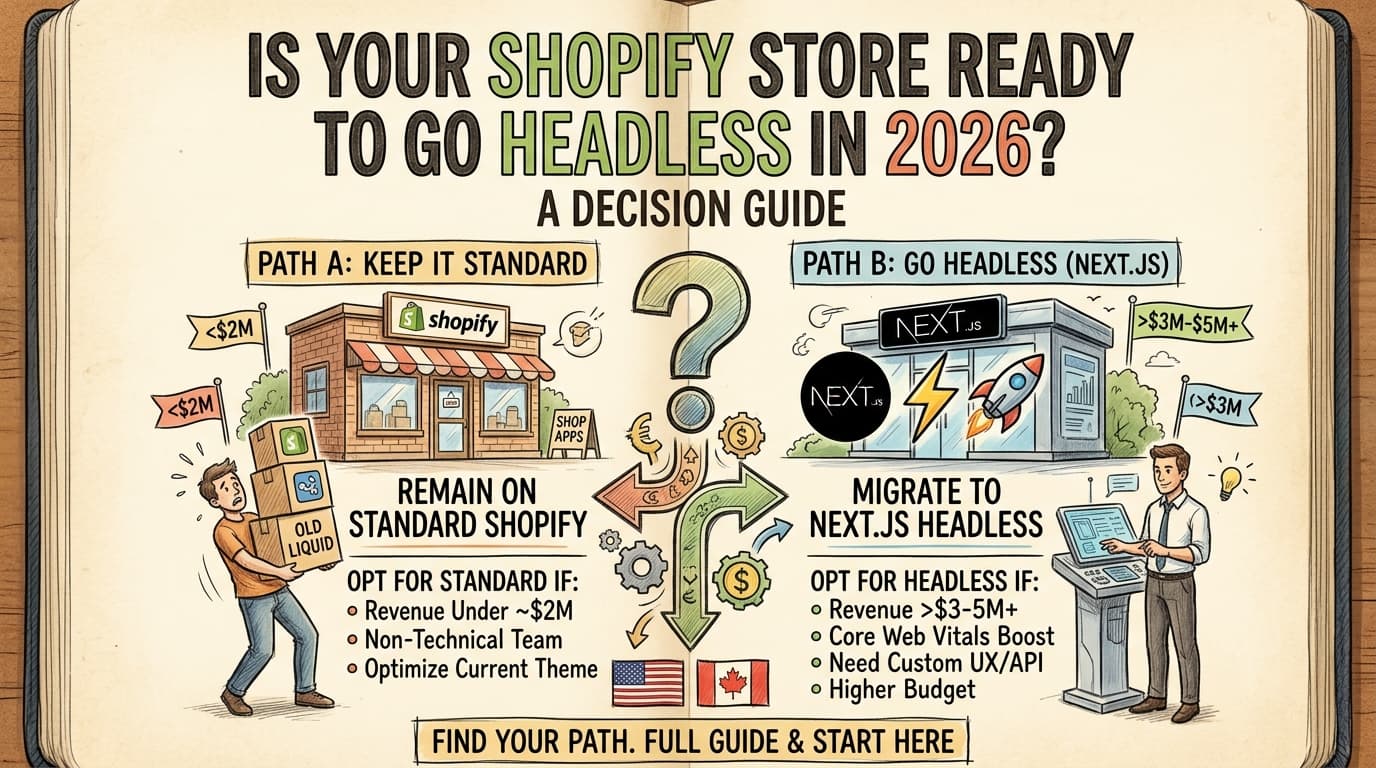
"Headless" has been the buzzword hovering over ecommerce for a few years now, but 2026 is the year it stopped being optional advice for a handful of enterprise brands and became a real decision most growing Shopify stores need to make deliberately not by accident. Here's how to tell if you're actually ready, what it costs, and when you should just leave your store alone.
What "Going Headless" Actually Means
In plain terms: your storefront (what customers see and click through) gets separated from Shopify's backend (inventory, payments, orders). Instead of Shopify rendering your pages with its Liquid templating, a framework like Next.js builds the frontend and pulls product, cart, and checkout data from Shopify through its Storefront API. Shopify still runs the commerce engine you're just replacing the "front door."
The Performance Gap Is Real, Not Marketing
This is the part that actually matters for your revenue. Traditional Shopify themes especially once you've layered on a dozen apps tend to average Lighthouse performance scores in the 60–75 range. Headless storefronts built with Next.js's App Router routinely land at 90+, largely because React Server Components cut the JavaScript sent to the browser by roughly 40–60% compared to a fully client-rendered theme.
That's not a vanity metric. The conversion data behind it is blunt: every 100 milliseconds shaved off load time tends to move conversion rate by about 1%. On a store doing real volume, that adds up fast.
Should You Actually Go Headless? A Quick Framework
Signs you're a strong candidate:
- Annual online revenue north of $3–5M
- Core Web Vitals are visibly bottlenecking sales (slow LCP, layout shift, high bounce on mobile)
- You need custom integrations or a UX your theme genuinely can't support
Signs you should stay on standard Shopify (for now):
- Annual revenue under ~$2M
- You're leaning on 15+ one-click apps to run the store
- Your team is non-technical and manages the storefront directly through Shopify's admin
If you're in the second bucket, the better first move is usually optimizing your existing theme trimming apps, image weight, and third-party scripts — before spending headless-level budget.
What It Costs and How Long It Takes
Enterprise-grade headless builds typically run $75,000–$250,000+, with ongoing maintenance in the $2,000–$8,000/month range once it's live. That's a real investment, which is exactly why the decision framework above matters this isn't a project to start on instinct.
Why Next.js Specifically (Not Just "Go Headless")
Shopify's own Hydrogen framework is a solid option if you're fully committed to Shopify's ecosystem, but Next.js has a few practical advantages worth knowing:
- Talent pool. The Next.js developer pool is significantly larger than Hydrogen's, which matters when you need to hire or scale a team later.
- Platform flexibility. A Next.js frontend built against Shopify's Storefront API isn't permanently welded to Shopify — if you ever needed to swap commerce platforms, the frontend investment carries over more cleanly.
- Timing. Shopify's Spring 2026 platform update decoupled Hydrogen from its original Remix-only setup, making it framework-agnostic and easier to pair with Next.js than it was even a year ago. For Shopify Plus merchants specifically, Shopify Scripts (used for custom checkout logic) reached end-of-life on June 30, 2026 — anyone still relying on it needs to migrate that logic to Checkout Extensibility anyway, which makes this a natural moment to evaluate headless rather than patch around an old setup.
What It Looks Like in Practice
This isn't purely theoretical — brands that have made the move report gains beyond raw speed. One documented case saw pages-per-session rise nearly 11% after a headless migration, alongside consolidating two separate storefronts into one using the Storefront API — the kind of operational cleanup that's hard to do inside a standard theme.
Not Sure Which Bucket You're In?
If you're unsure whether your store clears the bar for headless, that's worth a real conversation before a real budget I work in exactly this stack (Shopify, Next.js, and the backend side with Supabase) and can help you figure out whether headless pays for itself for your store or whether your money's better spent elsewhere first. Get in touch or see recent work.
For the bigger picture on where web development is headed this year, see 5 Web Development Trends Shaping 2026.